
PlayerPrefs
数据持久化
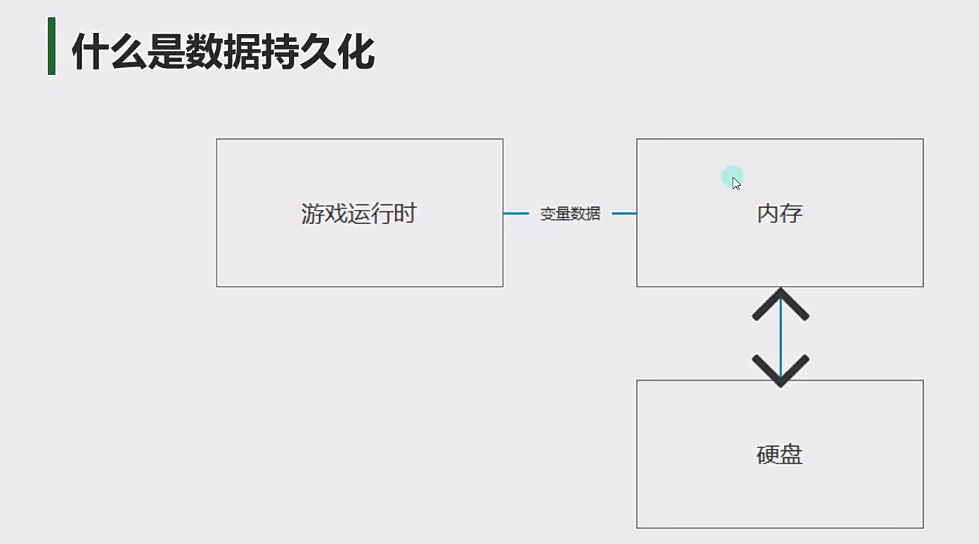
数据持久化是指将应用程序中的临时数据(如游戏进度、玩家设置等)永久保存到存储设备(硬盘、SD卡等)中的过程,以便在应用程序关闭后再次启动时能够恢复这些数据。
Playerprefs
PlayerPrefs是Unity提供的一个简单的键值对存储系统(键:string类型,值: int float string),用于在游戏会话之间保存和加载玩家偏好设置或简单游戏数据。它是Unity中最基础的数据持久化解决方案,是Unity提供的可以用于存储玩家数据的公共类
- 轻量级存储:适合存储少量简单数据(如设置、分数等)
- 跨平台:在所有Unity支持的平台上工作
- 自动持久化:数据会保存在设备本地
- 三种数据类型:支持int、float、string三种基本类型
关于Playerprefs最基础的用法是直接使用Set方法进行数据的存储,但是在运行的过程中只会存储在内存中,需要在结束时,Unity会自动将其存入硬盘中。如果游戏运行的过程中崩溃,那么则不会存储在硬盘中。可以使用自带的Api,Save方法进行自动存储。
1 | using UnityEngine; |
同时,如果使用不同的数据类型对同一键名进行存储时,数据会进行覆盖。只要在运行时使用了Set方法的对应值,即使没有马上存储Save在本地,也能够读取出数据。如果找不到键对应的值,那么返回函数的默认值,如果找到,则不会返回默认值。
1 | float score = PlayerPrefs.GetFloat("Score",100)//如果找到Score的值,则返回对应的值,如果没有,则返回100 |
删除数据:删除指定的键值和删除所有的存储的信息
1 | PlayerPrefs.DeleteKey("Score"); |
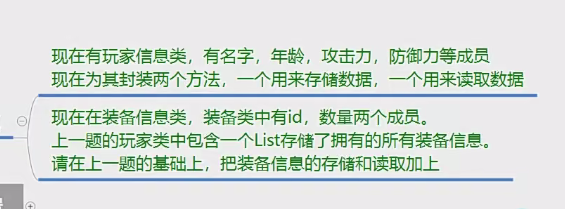
例题
1 | using System.Collections; |
存储位置
PlayerPrefs的数据存储位置因平台而异:
- Windows:注册表中(
HKEY_CURRENT_USER\Software\[公司名]\[产品名]) - Mac:
~/Library/Preferences/[bundle identifier].plist - iOS/Android:应用的沙盒目录中
PlayerPrefs的唯一性
1.基于键(Key)的唯一性
- 键是唯一的标识符:每个键对应唯一的值
- 同键覆盖原则:对同一键多次赋值会覆盖前值
1 | PlayerPrefs.SetInt("Score", 100); // 第一次存储 |
- 应用级别的唯一性
- 按应用隔离:数据只对当前应用唯一
- 不同应用不共享:即使在同一设备上,不同Unity应用的PlayerPrefs互不干扰
- 平台级别的唯一性
- 跨平台不共享:同一游戏在Windows、Android等不同平台的PlayerPrefs数据相互独立
- 同一平台不同安装:卸载重装后,PlayerPrefs数据通常会被清除(iOS/Android)
本博客所有文章除特别声明外,均采用 CC BY-NC-SA 4.0 许可协议。转载请注明来源 岁迹!
相关推荐

2026-06-27
Xml
数据持久化数据持久化是指将应用程序中的临时数据(如游戏进度、玩家设置等)永久保存到存储设备(硬盘、SD卡等)中的过程,以便在应用程序关闭后再次启动时能够恢复这些数据。 Xml 固定语法 1<?xml version="1.0" encoding="UTF-8"?> <!--版本和编码格式--> 在C#中读取XML文件的方法在C#中,你可以使用多种方式读取XML文件。以下是几种常用的方法: 1. 使用XmlDocument类(传统方式)1234567891011121314151617181920212223242526using System.Xml;// 创建XmlDocument对象XmlDocument xmlDoc = new XmlDocument();// 加载XML文件xmlDoc.Load("path/to/your/file.xml");// 获取根节点XmlNode root = xmlDoc.DocumentElement;// 遍历节点foreach (XmlNod...
2026-06-27
Json
2026-06-27
2进制
字符串类型以及非字符串类型转换为字节数组分别使用BitConverter类和Encoding类进行转换 12byte[] bytes = BitConverter.GetBytes(1); //非字符串byte[] bytes1 = Encoding.UTF8.GetBytes("11111"); //字符串 字节数组转为其他类型的数据 12int i = BitConverter.ToInt32(bytes,0); string str = Encoding.UTF8.GetString(bytes1);//这个字符数组全是字符串 对于如何将类序列化,不能直接使用C#中的BinaryFormatter进行2进制的序列化,因为是C#语言的规则与其他语言的兼容性不好,如果使用它那么其他语言开发的服务器无法进行反序列化,使用需要自定义处理类对 文件写入以及创建12345678910111213141516FileStream fs = File.Create(path);//创建文件------------------------------------...
2026-06-27
UnityShader
渲染管线为后续的渲染操作提供数据,包括顶点,材质,法线,纹理等。应用阶段由 CPU 负责,剔除不可见物体、整理渲染资源、优化合批、准备 Shader 参数、生成并提交 DrawCall,为 GPU 渲染做好全部前置准备。 渲染管线 指的是将三维场景中的网格、纹理、灯光等数据,最终转换成二维屏幕图像的一系列步骤。你可以把它想象成一个流水线,原料(模型数据)从一端进入,经过一系列加工(变换、光照、着色等),最终产品(像素图像)从另一端出来。(将数据分阶段变成屏幕图像的过程 应用阶段 -> 几何阶段 -> 光栅化阶段) Unity 主要支持两种渲染管线: 1.内置渲染管线:Unity 传统的、固定的渲染管线。开发者对其流程的控制相对有限,主要通过设置影响一些开关和参数。 2.可编程渲染管线:Unity 现代的高端解决方案,允许开发者通过编写 C# 和 Shader 代码来完全控制和定制渲染的每一个阶段。主要包括: •Universal Render Pipeline:通用渲染管线,适用于所有平台(移动、PC、主机),是新项目的推荐选择。 •High Definition ...
2026-06-27
梦加网络
简单描述C#中的闭包?以及写一段闭包代码Unity中几种常用的资源加载的方式以及应用场景
2026-06-27
DoTween
Unity DoTween 详解一、概述DoTween(现称为 DG.Tweening)是一个功能强大、性能优异的Unity动画插件,它提供了比Unity原生动画系统更简洁、更灵活的API来创建各种补间动画。 二、安装方法1. 从Asset Store安装(推荐新手)- 在Unity Asset Store中搜索”DOTween (HOTween v2)” - 免费版功能完整,专业版(收费)提供额外功能 2. 通过Git URL安装(Package Manager)- 打开Package Manager → Add package from git URL - 输入:https://github.com/Demigiant/dotween.git?path=Demigiant/DOTween/Assets/DOTween 3. 安装后设置12345// 第一次使用前需初始化using DG.Tweening;void Start() { DOTween.Init();} 三、核心功能与语法1. 基本动画方法12345678910...